TraderTape Wealth — User Guide
Everything you can do from the sheet, in the order you'll likely do it.
- First-time setup
- The menu
- The sidebar
- The dashboard
- Adding holdings manually
- Importing a CAS statement
- Importing CSV / bank PDFs
- Live prices & NAVs
- Goals & projections
- Legacy / estate planning
- Troubleshooting
First-time setup#
- Open your TraderTape Wealth sheet and reload the page.
- A 💰 TraderTape Wealth menu appears (give it a few seconds on first load).
- Click Set up / repair tabs — this creates every tab and opens the sidebar.
- Authorize when prompted — Google will ask you to allow the add-on to work with your sheet. Grant access to continue.
The menu#
| Item | What it does |
|---|---|
| Open dashboard | Opens the sidebar (KPIs, allocation, goals, quick-add). |
| Full dashboard (chart view) | Opens the rich chart dialog. |
| Import CAS (NSDL / CDSL / CAMS) | Import a depository or MF CAS PDF. |
| Import broker / bank CSV | Import a CSV, or a password-protected bank-statement PDF. |
| 🆘 Estate / ICE report | The printable "In Case of Emergency" inventory. |
| 👪 Trusted contacts & summaries | Manage trustees; email masked summaries. |
| 🔐 Generate encrypted trustee report | The encrypted, split-key report. |
| Refresh MF NAVs | Pull the latest NAVs from AMFI. |
| Refresh stock prices | Pull latest prices via GOOGLEFINANCE. |
| Resolve stock tickers (from ISIN) | Turn CAS company names into NSE tickers. |
| Refresh everything | NAVs + prices in one go. |
| Enable / Disable daily auto-refresh | Schedule a daily 8am refresh. |
| Set up / repair tabs | Re-create any missing tab / fix headers. |
| Clear MF & Stock holdings | Wipe MF + Stocks rows (for a clean re-import). |
The sidebar#
Opens inside the sheet and shows: net worth, invested, unrealised P&L, portfolio XIRR, an asset-allocation breakdown, goal progress, and a ➕ Quick add form.
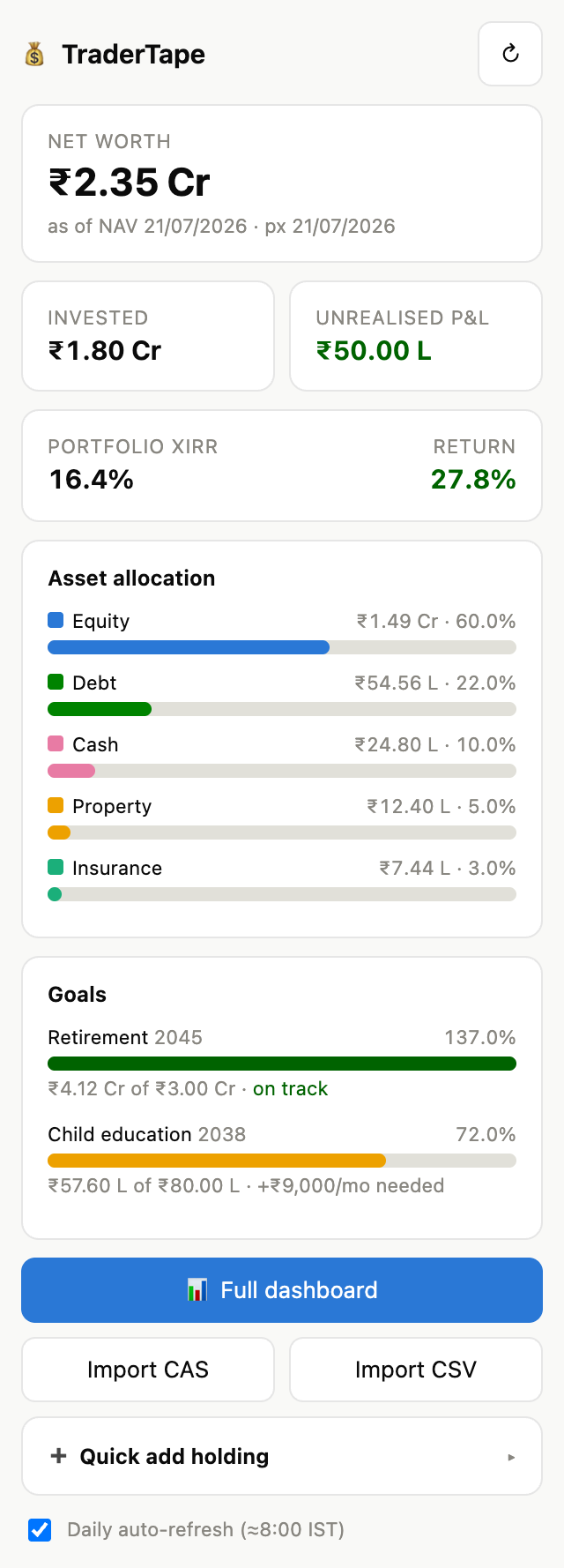 The ↻ button refreshes NAVs + prices with staged
progress and flags anything it couldn't price. A checkbox toggles daily
auto-refresh.
The ↻ button refreshes NAVs + prices with staged
progress and flags anything it couldn't price. A checkbox toggles daily
auto-refresh.
The full dashboard#
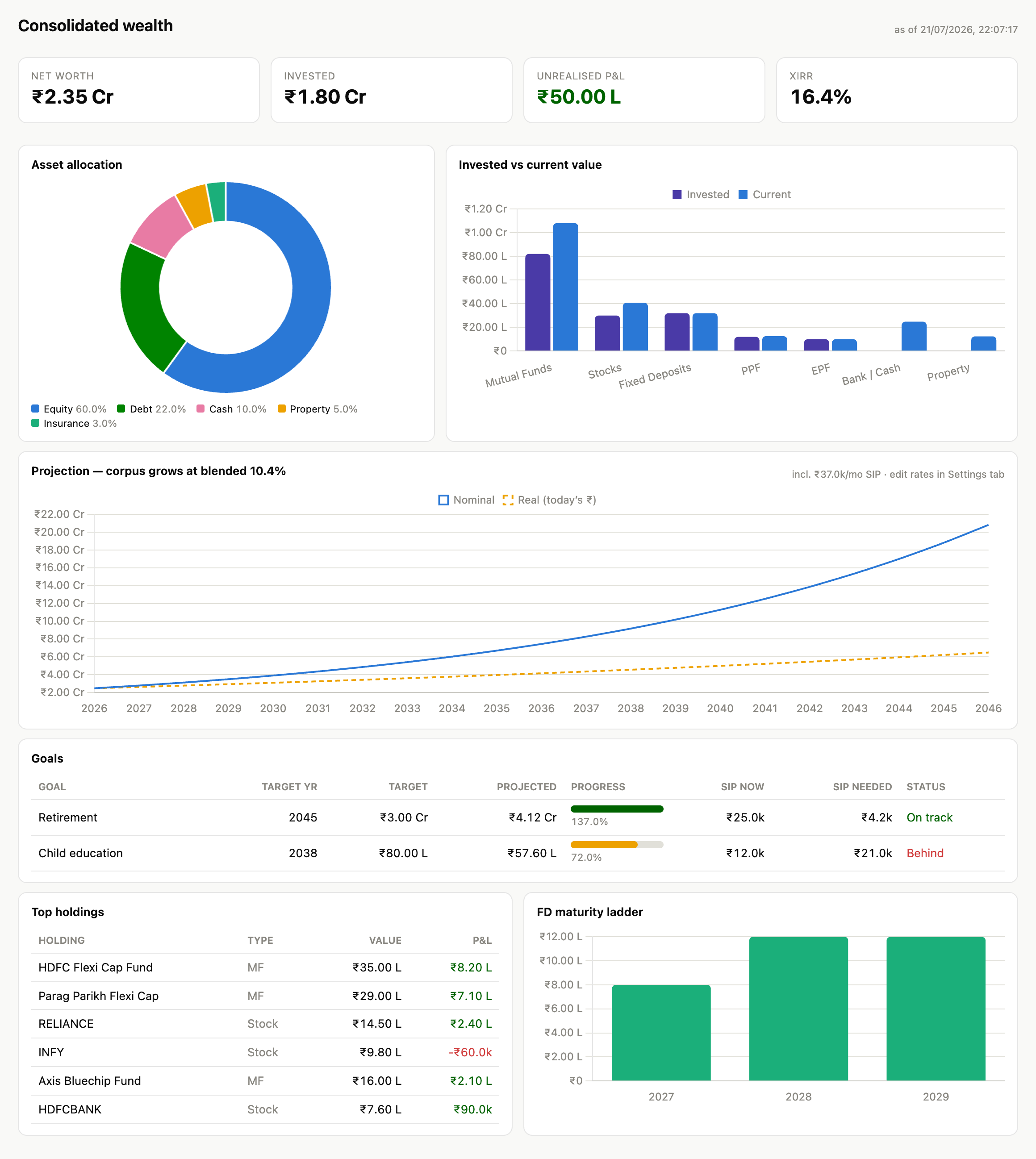
A modal chart view: allocation doughnut, invested-vs-current bars, a 20-year projection (nominal vs. real, including any SIP), a goals table (projected vs target, SIP now vs needed, on-track/behind), top holdings, and the FD maturity ladder.
Adding holdings manually#
Use the sidebar's ➕ Quick add holding: pick a tab, fill the fields (enum fields like Insurance Type, FD Compounding, Property Type are dropdowns; amounts/dates use proper inputs), and Add. Manual tabs: Fixed Deposits, PPF, EPF, Insurance, Bank Accounts, Property, Loans, Goals (and you can hand-add MF/Stocks/Transactions rows too). You can also type directly into any tab.
Importing a CAS statement#
Menu → Import CAS. Works with:
- NSDL / CDSL consolidated CAS (covers demat stocks and MF folios, across all your demat accounts), and
- CAMS / KFintech mutual-fund CAS.
Steps:
- Choose the PDF and enter its password (usually your PAN in CAPITALS). The file is parsed entirely in your browser — it never leaves your machine.
- Review the preview (funds, stocks, demat accounts, transactions detected).
- Leave Replace existing MF & stock holdings checked (a CAS is a full snapshot — this clears stale rows) and click Import into sheet.
- Progress is shown in stages: Writing… → Fetching latest NAVs… → Done.
After import: stocks are grouped by demat account (e.g. CDSL 52646740), the
Demat Accounts tab lists each account (set a friendly Nickname), and
ISINs are resolved to NSE tickers so prices refresh live.
If a parse looks off: expand 🛠️ Extracted text in the dialog to review the raw lines, and contact support with a redacted sample so it can be improved.
Importing CSV / bank PDFs#
Menu → Import broker / bank CSV. Accepts a CSV (Zerodha/Groww/Upstox exports, or a bank statement) or a password-protected bank-statement PDF. Choose the target tab, map the columns (auto-matched where possible), preview, and import. Bank PDFs are decrypted in-browser; column direction (debit/credit) may need a manual check — prefer your bank's CSV export when available.
Live prices & NAVs#
- MF NAVs come from AMFI's public daily file (matched by ISIN, then AMFI code).
- Stock prices use
GOOGLEFINANCE("NSE:<ticker>"); CAS company names are resolved to tickers via a bundled ISIN→symbol map. - Anything that can't be priced (unknown ticker, BSE-only, etc.) keeps its last imported value and is flagged after a refresh.
- Daily auto-refresh runs ~08:00 IST when enabled.
Goals & projections#
Add rows to the Goals tab (target amount, target year, monthly SIP, expected return, current corpus). The dashboard shows each goal's projected value, progress, and the SIP required to hit the target, and folds total SIP into the top-line projection. Return/inflation assumptions live in the Settings tab.
Legacy / estate planning#
A three-part system so your family can find and access your finances. Full detail, including the security model, is in LEGACY.md. In short:
- Nominees & contacts — recorded on Bank, FD, PPF, EPF, Insurance, and Demat Accounts tabs; Property and Loans tabs complete the picture.
- 🆘 Estate / ICE report — a printable inventory with a Full/Summary toggle (Summary masks account numbers). Print/Save-PDF and store it securely.
- 👪 Trusted contacts — add trustees and email them a high-level or masked summary periodically. Full detail is never emailed.
- 🔐 Encrypted trustee report — encrypts your full inventory in-browser and splits the key so any k of n trustees can decrypt together (default 2-of-3). You get the encrypted file, printable share cards, and an offline decryptor.
Troubleshooting#
| Symptom | Fix |
|---|---|
| Menu doesn't appear | Wait a few seconds and reload; re-run Set up / repair tabs. |
| CAS import: wrong password | It's case-sensitive; PAN is uppercase (e.g. ABCDE1234F). |
| Stocks show ₹0 after CAS import | Re-import with Replace on (clears stale rows); ensure you're on the latest code. |
| Stock prices don't refresh | Run Resolve stock tickers (from ISIN); some ISINs (BSE-only/delisted) can't be priced. |
| Estate report empty / error | Reopen it; it now surfaces the real error with a Retry button. |
| A demat account looks wrong | Re-import; the Demat Accounts tab rebuilds from the CAS (nicknames preserved). |
| Sending summary asks to re-authorize | Expected — the mail scope was added; approve once. |